Saturday, February 7, 2015

SEXTANT - A simple step-by-step introduction to using a sextant for navigational purposes

<This is a personal weblog which I write for my own entertainment, and hopefully the entertainment of my readers along the way.
The views/opinions/experiences are those of myself, and in no way shape or form is in relation nor reflects those of  my current or former employers, or schools and academic institutes.
I link to external sites within my pages, I do not necessarily agree or disagree with their data, content, views, etc. I post these links for my audience>

Hello Mates!

Good day to all of you. I have been browsing sites and found this cool tutorial. Hope you like it.

This tutorial is ideal for cadets and aspiring officers.


Link for download: http://1drv.ms/1DCWQ9R

Copyright Theft / Piracy
I sometimes write posts, or post links to ‘illegal’ sites or ideas; i.e. software ‘piracy’ or copyright ‘theft'; I neither condone or recommend following my example; assume that I have linked, or posted these for academic reasons only and that I am not actively breaking the “Law”; heck who doesn’t like tinkering.

Please don’t assume anything I have done / linked to / said etc. is a good idea; I am in no way condoning copyright theft despite making a complete digital copy of something in no way removes the original from any one… so is hard to call theft. and Piracy is a sucky name for it too! I still recommend you to download the paid software and app after the test.

Mariners Leeway now in ANTIQUE


<This is a personal weblog which I write for my own entertainment, and hopefully the entertainment of my readers along the way.
The views/opinions/experiences are those of myself, and in no way shape or form is in relation nor reflects those of  my current or former employers, or schools and academic institutes.
I link to external sites within my pages, I do not necessarily agree or disagree with their data, content, views, etc. I post these links for my audience>


Friday, February 6, 2015

Vessel Monitoring App (Marine Traffic)

Marine Traffic (Android App)

<This is a personal weblog which I write for my own entertainment, and hopefully the entertainment of my readers along the way.
The views/opinions/experiences are those of myself, and in no way shape or form is in relation nor reflects those of  my current or former employers, or schools and academic institutes.
I link to external sites within my pages, I do not necessarily agree or disagree with their data, content, views, etc. I post these links for my audience>


To all my fellow mates out there, this is one of the good android app which you could install in your phone. This is ideal for any mariners and their families who intends to monitor their vessels current port or position.

In this full version of the app you can actually subscribe and add vessel into you fleet. When your vessels is added on your fleet, it sends you an email notification upon their arrival and departure from port. Live monitoring is also available as long as you have an internet connection.

This is also applicable to joining crew if their vessel's name is already known. You can monitor its current position as long as its under the VHF range (50 miles, not really sure).

How to install:

Download and copy the file to you phone memory or SD card. Run the installer. For those phone in which it is restricted to install, without enabling this option you won’t be able to install the APK directly. To enable Unknown Sources go to Settings > Security and check the box next to” Unknown Sources “. A dialogue box may pop-up asking you to confirm the action, just tap OK to confirm.
 
Subscribe your email account on the settings and search for the name of your vessel and add it to your fleet. EASY!


Mariners Leeway is now serving Antiqueños.
By Appointment ONLY! Mon-Sat 9AM-5PM
Email:  marinersleeway@gmail.com
            marinersleeway@yahoo.com
            marinersleeway@hotmail.com
Like Us on Facebook: https://www.facebook.com/pages/Mariners-Leeway/1779022462323063
Blogsite: http://marinersleeway.blogspot.com/
Mobile: 09266165063
Home/Office (036) 5403696 Look for Jay
 
Copyright Theft / Piracy
I sometimes write posts, or post links to ‘illegal’ sites or ideas; i.e. software ‘piracy’ or copyright ‘theft'; I neither
condone or recommend following my example; assume that I have linked, or posted these for academic reasons only and that i
am not actively breaking the “Law”; heck who doesn’t like tinkering.
Please don’t assume anything I have done / linked to / said etc. is a good idea; I am in no way condoning copyright theft
despite making a complete digital copy of something in no way removes the original from any one… so is hard to call theft.
and Piracy is a sucky name for it too! I still recommend you to download the paid software and app after the test.
 

Navibe Bluetooth GPS Receiver
Model: GB337

My Review:

Well this is one of my best model of GPS receiver which I bought. It quickly picks up GPS fix and can be used on any ECDIS program on your computer. I was unable to try it my mobile phone as a GPS unit as most of the android phone are capable of GPS tracking (this will be discussed on my upcoming blog - How to use your android mobile  phone with GPS capabilities as your GPS for your ECDIS program.)

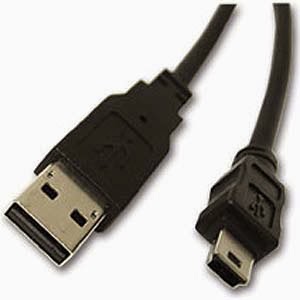
This unit  is user friendly, connecting and pairing it thru Bluetooth is very easy, no driver is needed and can be charge using any mini USB connection, plugged on a PC or on a separate USB charger.
USB to mini USB connector/charger
For those who are curious if this unit can be used using USB cable only with out any Bluetooth, you can't. The mini USB connection is used for charging only. However for those PC with out any built-in Bluetooth, you can buy any plug and play Bluetooth dongle compatible to your PC. Here in the Philippines you can buy it on any CD-R King shops http://www.cdrking.com/?mod=products&type=category&subcatid=595. It's so cheap but it works.

Navibe Bluetooth GPS Unit Manual: http://1drv.ms/1zH6plh


Specifications:
Compatible with Symbian S60 3rd edition, Windows Mobile 5.x and higher
PC: Windows 98 - XP or Apple Macintosh or later with a Bluetooth enabled Specifications:
Specifications GPS Chipset: MSTAR (USA)
Frequency: L1, 1575.42 MHz
C / A code: 1023 MHz (frequency chipset)
Channels: 20 channels to track up to 48 satellites
Antenna (internal): Built-in low noise ceramic antenna
Sensitivity: -152 dBm
Time to First Fix: - Cold Start: approximately 45 sec. - Warm Start: approx. 30 sec. - Hot Start: about 2 seconds.
Recovering bearing: Refreshing position: 1 sec.
Positioning: open sky - speed: 0.1 m / sec, without SA
Time: ok.100ns synchronized to GPS time
Power Supply: Rechargeable Li-battery -ionowa
current (working) -
Operating time up to 14 hours. (Full battery, tracking mode)
Charging time 3 hours. (Typical)
communication protocol: communication with host platform via Bluetooth (Class 2)
Bluetooth communication range - 10 meters (typical)
Protocols GPS - default: NMEA-0183 V3.01 - GGA, GSA, GSV, RMC, VTG
Data Transfer: 9600 bps- Data Bit 8 Bit stop: 1 (default)
Dimensions: 87 (L.) x 43 (W.) X13 (H.) mm

Mariners Leeway is now in Antique!
By Appointment ONLY!
For inquiries:
Email:  marinersleeway@gmail.com
            marinersleeway@yahoo.com
            marinersleeway@hotmail.com
Like Us on Facebook: https://www.facebook.com/pages/Mariners-Leeway/1779022462323063
Blogsite: http://marinersleeway.blogspot.com/
Mobile: 09266165063
Home/Office:  (036) 5403696 (9AM-5PM) Look for Jay


Desclaimer: Some external links may contain spyware, viruses  almost certainly contains bugs, errors, and omissions. Some programs may or may not be useful to you. I make no promises that it will not cause your computer to explode, but if it does, rest assured that it was accidental and I am very sorry. However, I won’t be sorry enough to pay for any damages: direct, incidental, or imaginary.

Thursday, February 5, 2015

2015 a Fresh Start

Good day Mariners,

This year was not a good start for mariners and travelers like us due to maritime and airline incidents and there's MARINA new processing procedures but nevertheless we stay strong, pray and be committed.

This year I will be blogging about foods, places to stay when in Manila and more about navigation and seamanship.

I will also include companies that hires and accept seafarers.

Issues and commentaries relating to shipping and alike.

Hope to blog to you soon!

Cheers!

Monday, May 19, 2014

NavMonPC

NavMonPC is a Windows program for the capture, display, and playback of NMEA-0183 data. The user interface is optimized to run on a low-power, small-format “netbook” style of computer, but it will operate on any Windows-compatible machine. It is not intended to replace a chartplotter (NavMonPC does not display standard navigational charts) but instead, this program is designed to supplement your chartplotter and provides additional feature and convenient access to important navigational system data.
NavMonPC features include but not limited to:
  • ·         Dial display of critical parameters and conditions
  • ·         AIS (Automatic Identification System) decoding and target display, including flexible proximity and approach alarms
  • ·         Enhanced AIS performance using RapidAIS
  • ·         Anchor-watch alarm
  • ·         Depth Alarms
  • ·         Course, Heading, Speed, Wind alarms
  • ·         Man Overboard alarm
  • ·         Strip-chart style displays of course and speed, windspeed and direction, water depth and
  • ·         temperature
  • ·         Concise on-screen log display
  • ·         Logging to file
  • ·         Flexible filtering and routing of input data
  • ·         Multiple RS-232 serial interfaces, and TCP/IP network interface
  • ·         Multiple "Virtual serial port" outputs of bridged / routed data for use by other programs
Detailed user and installation guide can be downloaded here: http://www.navmonpc.com
Download latest version of NacMonPC here: http://www.navmonpc.com/downloads.html


On my own point of view, NavMonPC is best can be as supplement to your chartplotter onboard. The features that the basic user can be used are the GPS position, course, speed, AIS plotter, speed chart, log, log comment, MOB and virtual serial ports.
In order to use the operation of NacMonPC, take note of the COM ports used by the GPS and AIS connected on your PC or laptop. Set-up serial ports as per indicated in the user guide. It can also connect on any TCP/IP serial connection.
For me, the AIS plotter has been the most useful part of the program. It displays real time target information. Better than browsing thru a limited button features of AIS unit onboard. It triggers CPA alarm as per you setting. Alarms are a bit loud, especially on triggering the MOB.
Another cool feature of this program is the “Virtual serial port”. This virtual serial ports bridge the connected serial ports on the NavMonPC to be used for any other programs such as the chartplotters or ECDIS. It imitates the data collected from NavMonPC to your chartplotter. On the Transas NaviSailor program, NMEA sentences the for the AIS COM port are mix of GPS and AIS which for me is a good feature because it corrects any failed data from AIS unit such as position fixing.
NavMonPC is very useful for those who does not have chartplotter installed onboard. The AIS radar like display makes it easier to identify vessel fitted with AIS. There’s no more guessing or taking bearings and browsing on a limited button display of fitted AIS unit onboard.


Rating:***** (Excellent)

Thursday, May 15, 2014

Transas NaviSailor 4000 ECDIS

Disclaimer: Please always use updated charts when using unlicensed ECDIS program. If this will be is installed and used onboard, make sure to label it "NOT TO USED FOR NAVIGATION. FOR TRAINING PURPOSES ONLY". This blog is created to help and assist novice mariners with regard to onboard navigation apps and programs. Some external links may contain spyware, viruses  almost certainly contains bugs, errors, and omissions. Some programs may or may not be useful to you. I make no promises that it will not cause your computer to explode, but if it does, rest assured that it was accidental and I am very sorry. However, I won't be sorry enough to pay for any damages: direct, incidental, or imaginary.

This is one of the best electronic chart plotter I have ever used. Powerful and user friendly program.
The only downside is, it can only be installed on Windows XP (Service Pack 2) operating system, in which we all know, Microsoft have already stopped sending supports and updates. But who needs it if you are only using it on board to your old sailing and navigation programs such as Skymate, Waypoint for Windows, Guide to Port Entries, etc.
This Russian made program can be downloaded on most of the Russian websites and forums, make sure you translate the page prior to downloading to avoid confusion.
Links:
Forum: http://www.morehod.ru/forum/transas/navisailor-4000-new-license-till-01-05-2010-t17086.html
Old Transas Tsunami Program: http://photoshopia.su/774397-transas-navigatortsunamis99.html
Download:
http://depositfiles.com/files/2y80kon1y
http://chomikuj.pl/RefleX96/Programy+PC/Navy+Sailor+3000+ECDIS-i+v+4.00.07/TRANSAS*2bCrack,1908441386.rar
Installing this programs takes about 5-10 minutes. The system date should be moved back to August 2009 in order for the license to be applied. One of the disadvantage is that the computer date must be always before October 2009. Safe way to do it is to move the date back to 2008 but be careful to mind the leap year on February. There are time stopper programs available online, it can make the program run on the present time and date but there are instances that during plotting, some outdated charts are used and the program will freeze and/or informs you that your license is already expired (you may lose any unsaved work if you close the notification window). In order to continuously plot and use the program is to set the date back to before October 2009.
Most of the charts on this program are outdated in the present date (2014) but some may be manually corrected. Chinese charts are the most outdated. I have been using the program onboard (MV Torrens, Livestock Vessel) for almost 4 years and I can say that it helped me a lot during my time serving as a 2nd Officer.
Advantages of using Transas NaviSailor 4000 ECDIS
1. Powerful and user friendly.
2. Calculates ETA.
3. Tide table available.
4.  Really nice night mode configuration.
5.  Routes can be used on SPOS prorgams. Easily copied and paste on any transas program (Tsunami'99, NS4000 & NS3000EI).
6. Zoom charts using +/- button or scroll by mouse.
6. Dual monitor good for channeling and docking.
7. Can monitor heading, COG, SOG and ROT.
8. Time can be synchronized by GPS.
9.  Setting-up COM ports is very easy (Bluetooth or Serial connection)
10 Configuration menu are easy to use.
11. Can predict ETA to next waypoints.
12. Change time zone accordingly.
13. Can use on to different computer as Master and Slave.
14. Manual correction is available.
14. ...An a lot more. Just browse your way around the program
Disadvantages  of using Transas NaviSailor 4000 ECDIS
1. Out-dated charts (last updates August 2009).
2. Computer date must always before October 2009.
3. Cannot update charts online (no updates available).
Don't forget to post you comments and additional info that may be useful to this blogger. Please report bad or deleted links.
Next topic: TelChart